Connecting a source
Toggl Track
The Toggl most people mean. If you already start and stop a timer there, the hours are recorded and nothing about how you work has to change.
New here? Toiling Away turns recorded time into animals that live in a habitat of your own.
On the newer Toggl 2.0? That is a different product with a different API, and it has its own page. If your keys start toggl_sk_, you want that one.
Get your API token
-
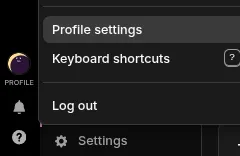
In Toggl Track, click your avatar at the bottom of the left sidebar and choose Profile settings.
-
Scroll to the bottom, where the
API tokensits. Reveal it and copy it. -
In Toiling Away, open
Connectionsand addToggl Track. It is checked immediately, so a token that will not work fails there and then rather than quietly never syncing.
What gets counted
Your own time entries, and only yours. The token identifies you, so there is nothing to choose and no way to point it at a colleague.
Only entries you have stopped. A running timer has no end yet, so there is nothing to count. It arrives on a later sync once you stop it.
An hour is ten toil. What an entry was called is not stored. Only when it started and stopped.
After that it looks after itself
It checks every fifteen minutes or so while you are working, and backs off when nothing is happening, so a quiet night is not thirty-two identical questions. There is a Sync now button if you would rather not wait.
Each sync re-reads the last twenty-four hours, so correcting an entry in Toggl corrects it here rather than leaving the first version behind.
Overlaps are merged. A stretch of afternoon covered by Toggl and by something else you have connected counts once. Tracking the same hour twice does not earn twice.
If it stops working
A connection that keeps failing shows the reason Toggl gave, in its own words, on the Connections screen. The usual cause is a token that has been reset. Paste the new one in and it picks up where it left off. Removing the connection stops the syncing; the toil you have already earned stays.