Connecting a source
Toggl 2.0
Toggl's newer product, sometimes called Focus. It is a different application from Toggl Track with a different API, so it connects separately.
New here? Toiling Away turns recorded time into animals that live in a habitat of your own.
Not sure which you have? Both keep the key in Profile settings, so the key itself is the tell. Keys here begin toggl_sk_ and carry an expiry date. If yours is a plain string with no expiry, you want Toggl Track instead.
Get an API key
-
In Toggl 2.0, click your avatar at the bottom of the left sidebar and choose
Profile settings. TheAPI tokensits on theToggl accounttab, below country and language.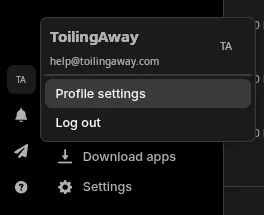
-
Choose an expiry and press
Refresh, then copy it straight away. It is shown once. There is only ever one active key per person, so refreshing retires the previous one, and anything using it stops. -
In Toiling Away, open
Connectionsand addToggl 2.0. Nothing else to fill in.
What gets counted
Your time in whichever workspace Toggl currently has you in, and only yours. The key says who you are, and the report we ask for is filtered to you by Toggl itself rather than by us, so a workspace administrator cannot earn from a colleague's hours.
A running timer is not a problem here. Toggl 2.0 reports a total per day rather than a list of entries, so we credit only the increase since the last look. A timer still going simply makes tomorrow's total larger.
An hour is ten toil, and what you were working on is not stored.
It thinks in days
The reports this reads give a total per day rather than a list of entries with times on them. So we ask what each day comes to and credit the increase since the last look.
That has one visible consequence. Toil is credited when it is noticed rather than when you worked, so it arrives in steps at a sync rather than the moment you stop a timer, and an hour tracked at noon may reach the habitat later in the afternoon. The total is right either way.
A day means a Toggl day. Where Toggl tells us which timezone your account keeps, we follow it, and where it does not we fall back to UTC. A long way from UTC that moves the boundary: this morning's work can sit in a day we have not asked about yet and arrive once the clock catches up.
If it stops working
The Connections screen shows the reason Toggl gave. The usual cause is a key that has reached its expiry date, or one that has been replaced, since only one is active at a time. Refresh it in Profile settings, paste the new key in, and it carries on from where it stopped without re-crediting the days it has already counted.